In the 1990s — before the rise of Internet Explorer and still several years before Google Chrome — the dominant web browser was Netscape, which held its lead until the mid-point of the first browser wars. Although Netscape officially died on 20 February 2008, a format developed by that company more than 25 years ago is still in use today: the RSS standard (Really Simple Syndication).
RSS is a format based on XML, a markup language that structures web content in a standardised way. Websites publish a file that is continuously updated and contains basic data for each entry: title, author, date, description/summary and a direct link, among other fields. Having a shared structure allows a compatible application — called a reader — to interpret content uniformly regardless of its source, centralising access to content from multiple sites within a single app.
What are the advantages of using RSS?
Beyond centralising practically all your content, the main advantage is that you have complete control over your feed. It is strictly chronological — no recommendations, no likes, no reposts. Every site, regardless of its size, has the same visibility. You are the algorithm: you add the sites you want to follow and discover new ones by word of mouth. There is no advertising either, unless the author deliberately includes it in their content.
The vast majority of websites have an RSS feed URL — more or less hidden1 — making it possible to add an almost endless number of sites to your reader. You can follow blogs, newspapers or podcasts (in fact, apps like Apple Podcasts are essentially RSS readers).
# Newsletter vs. RSS
A newsletter, as a mass email delivery service, consumes a significant amount of resources as it grows. This comes with associated costs that, if you are not paying directly (as with Substack), you will pay indirectly: the company will monetise your activity, your audience or your time.
With RSS you can access new content published on a static site (such as a blog) without those resource costs. Moreover, since RSS addresses are publicly accessible, you do not have to hand out your email address everywhere just to subscribe.2 Newsletters are great, but managing personal data gets complicated — even if you use a dedicated address — and either way you end up depending on yet another company.
One of the good things about Substack — I’ll save the complaints for another day — is that all its newsletters include a public RSS feed by appending /feed to the web address (giving you something like https://yournewsletter.substack.com/feed), so you can add it to any RSS reader without subscribing.
The downsides
Using a standard whose last version came out more than fifteen years ago does come with some constraints that, while some users may see as advantages, do limit functionality.
On one hand, getting push notifications — an alert the moment something is published — without relying on a third-party service can be tricky. That said, it is always possible to simply check your reader asynchronously — when you open the app or at predetermined intervals.
Using RSS means saying goodbye to metrics, since it is not possible to know how many people follow a site through RSS. Unlike newsletters, which necessarily consist of a countable list of email addresses, an RSS feed gives no access to any statistics.
Centralising content through a single platform also comes with limitations on styling. JavaScript and CSS stylesheets cannot be used; as a rule, the application you use to read the feed will apply its own formatting to all entries.
Getting started: the reader
There is a wide variety of readers available with varying numbers of features. Many platforms offer solutions for managing RSS feed lists and, in most cases, free tiers cover the needs of any basic user. Some even allow you to add websites that have no RSS feed, pulling content directly.
Since tastes vary, it is not a bad idea to dive in without too much planning and try some of the options that, on the face of it, should meet most requirements — such as Inoreader or Feedly. If you start with one platform and decide to move to another, you can always export your list of followed feeds and import it to the new one in seconds. To do this, readers give you the option to export an OPML file where your subscriptions are stored.
# What I use: NetNewsWire
NetNewsWire is a completely free, open-source, easy-to-use RSS reader compatible with macOS, iOS and iPadOS that syncs your feeds for free via iCloud or other compatible aggregators such as Feedbin, Feedly, Inoreader or FreshRSS3.
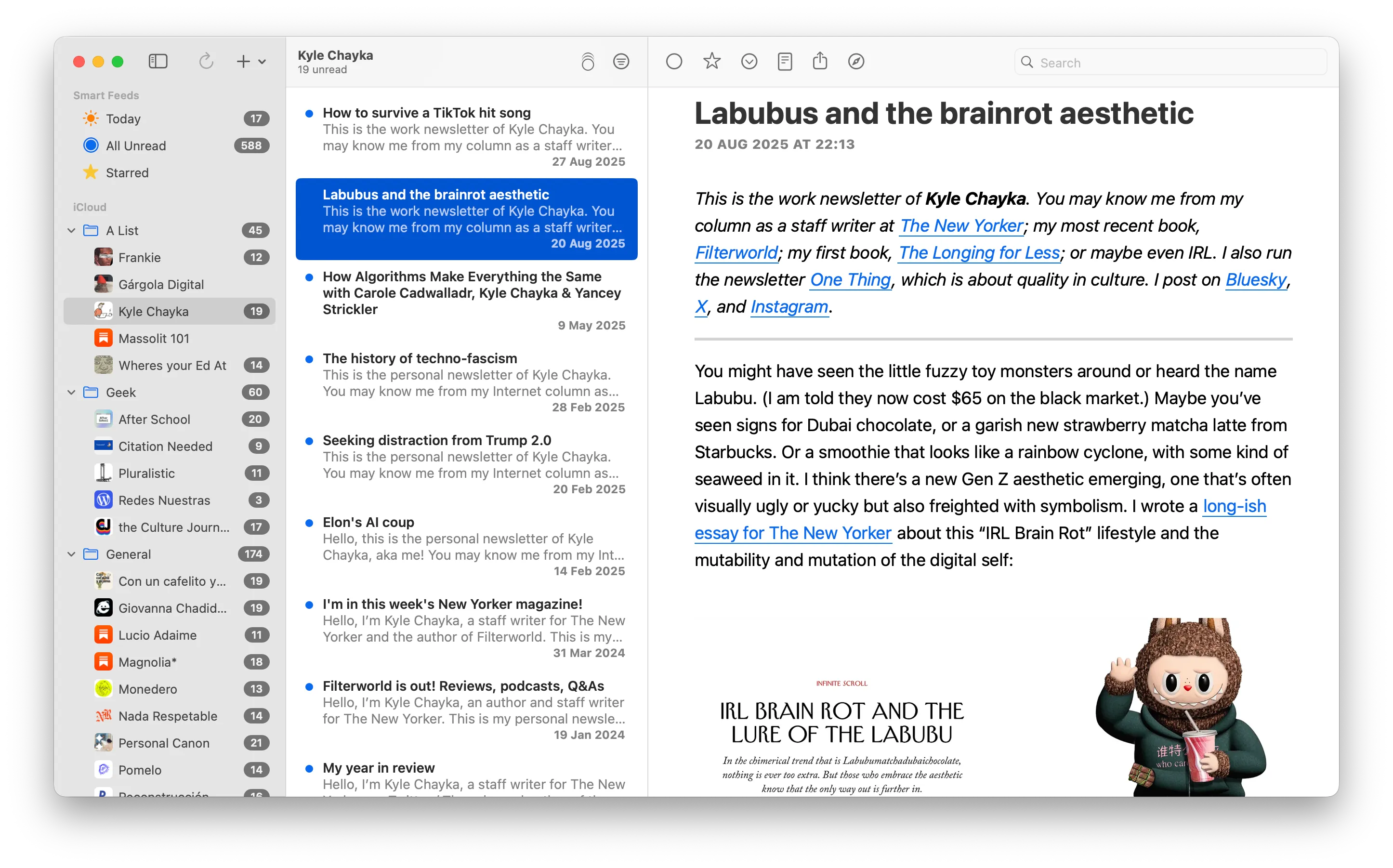
Feeds are sorted alphabetically into as many folders as you like, though the app offers three default “smart” lists: today, unread and starred.
Your feed list can be stored locally or, if you enable iCloud, synced across multiple devices. Just go to Settings → Accounts → iCloud → Enable inside the app, and from that point on, select iCloud whenever you add a new feed (if you disable local storage it is even simpler, as everything is automatically stored in iCloud).
In short, RSS brings order back to digital chaos. You choose your sites, you get the updates, and that’s it. No recommendations, no metrics. It is a very simple way to regain some control and go back to reading an Internet without noise.
Footnotes
-
Although some sites display the RSS icon in their menu or footer, appending
/feed,/rssor similar to the original address gives you direct access. Many readers can detect the RSS address automatically, and there are also tools for this. Sometimes the address is so hidden that you need to inspect the page source. ↩ -
The fact that an RSS address is public does not mean the author provides full content for free. Channels with paid content or advertising on their pages usually only offer a summary in the RSS feed along with a link to the full web page, but updates will still appear in your reader. ↩
-
FreshRSS is probably the best overall alternative, being an open-source aggregator compatible with a huge number of readers. The downside is that you have to set it up yourself on a server, which can be tricky without hosting experience. ↩